
Core Feature
Construction Project Management Software
Track budgets, schedules, team assignments, documents, and profitability in real-time. Know exactly where every project stands—in the office or on the job site.
Stop Flying Blind on Project Performance
Most contractors don't know if they're making or losing money on a project until it's too late to fix. BuilderMate gives you real-time visibility into every job so you can deliver on time, on budget, and on profit.
Complete Project Visibility
See everything about every project in one place—status, team, budget, schedule, documents, and communication.
Real-Time Profitability
Know exactly how much you're making on every job with live tracking of costs vs. budget vs. contract price.
Team Coordination
Assign crew members, track responsibilities, share updates, and ensure everyone knows what needs to happen next.
Progress Documentation
Upload photos from the field, document milestones, create before/after galleries, and share updates with clients.
Document Organization
Store contracts, permits, plans, change orders, and receipts—all organized by project and accessible anywhere.
Change Order Management
Track scope changes, get client approval, update budgets automatically, and protect your profit margins.
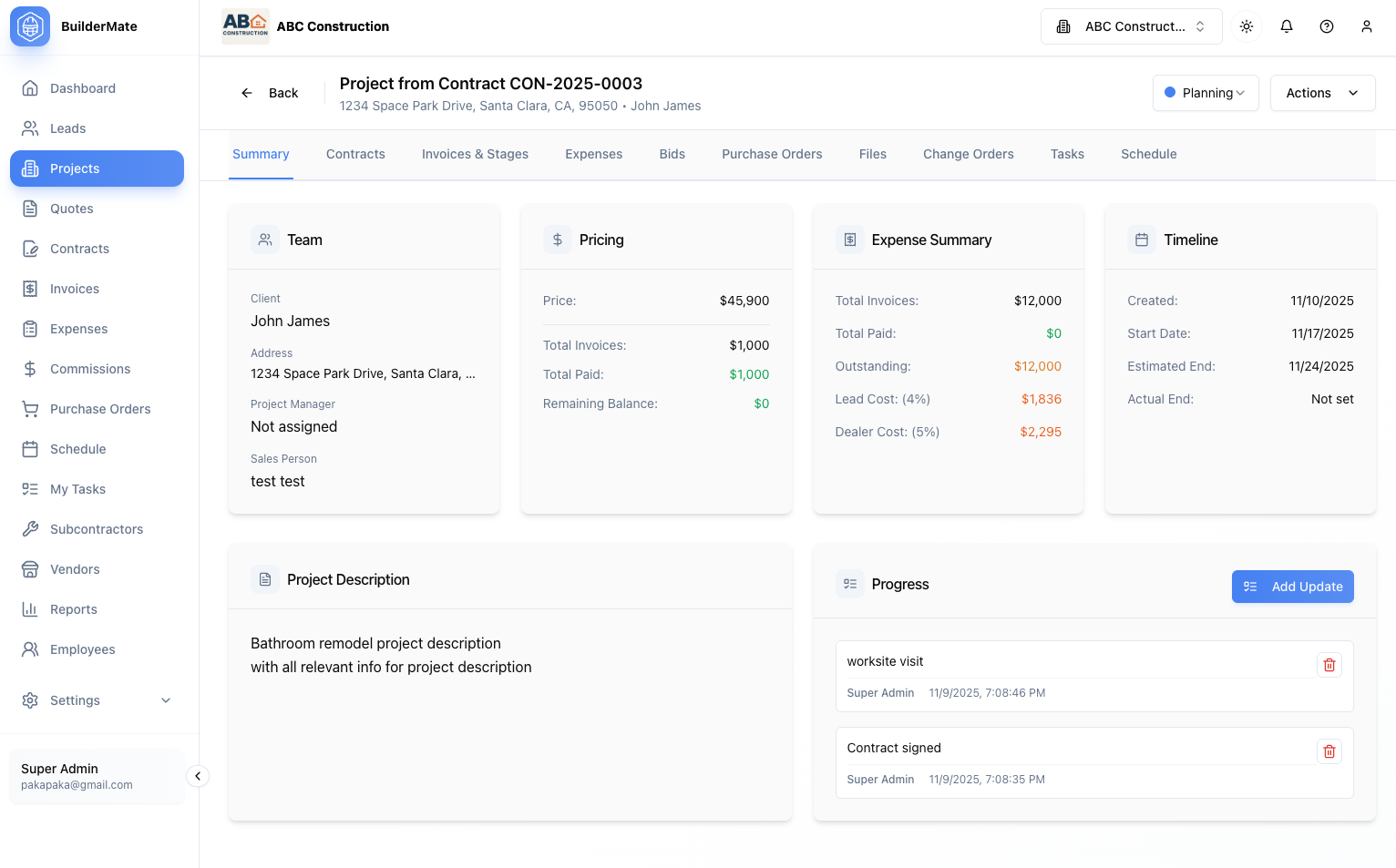
Project Dashboard & Timeline
Every project has a comprehensive dashboard showing status, team, financials, schedule, and recent activity. Multi-tab organization keeps contracts, invoices, expenses, purchase orders, and change orders logically separated but instantly accessible.
- Project summary with key metrics at a glance
- Start and end date tracking
- Status workflow (Pending > Active > Complete)
- Team member assignments with roles
- Project type categorization
- Mobile access from job sites
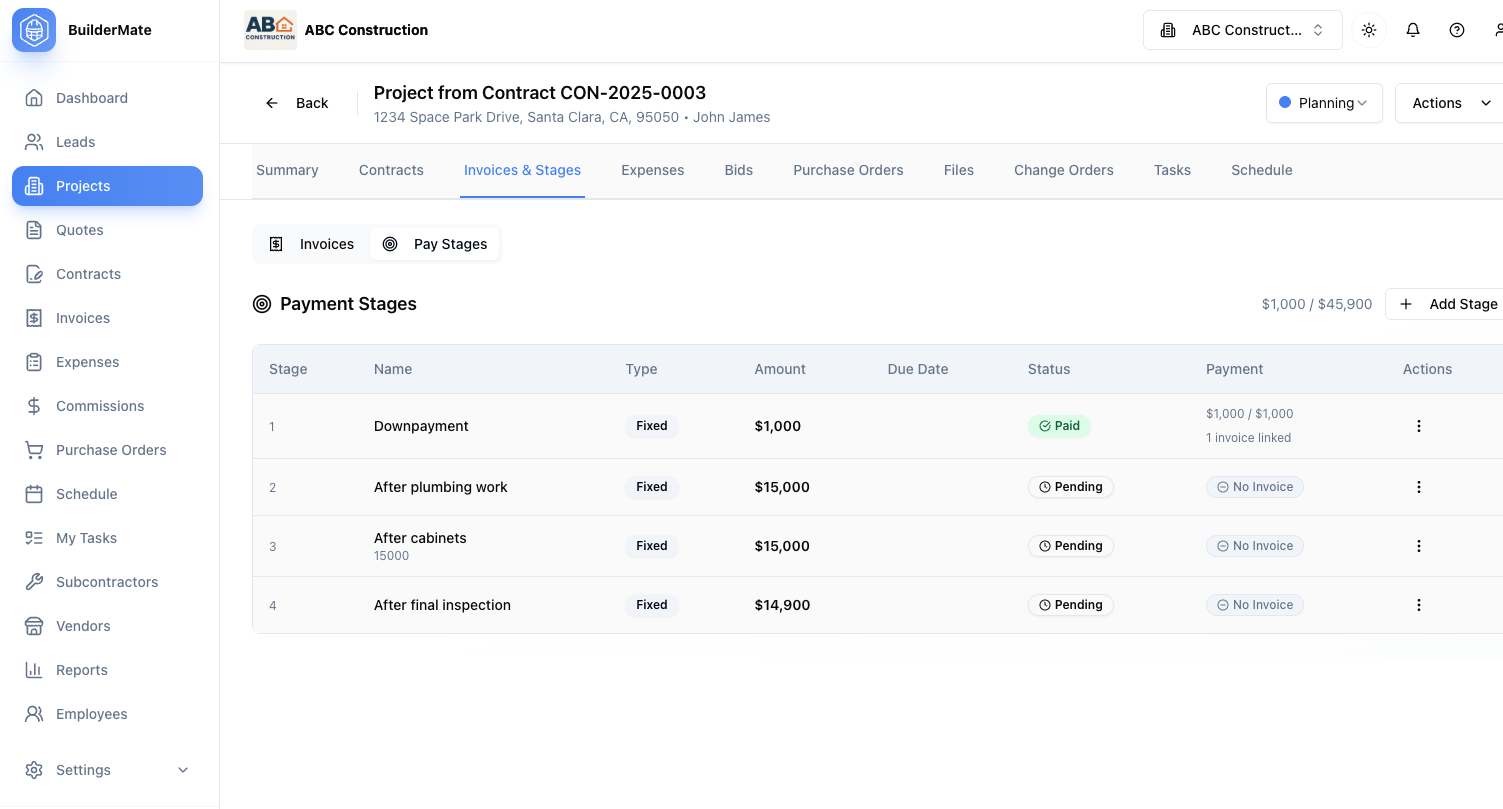
Budget & Job Costing
Track every dollar on every project. Compare actual costs against budget in real-time. See profit margins update automatically as expenses are logged. Know immediately if a job is trending over budget so you can take corrective action.
- Budget vs actual cost comparison
- Cost tracking by category (labor, materials, subs, equipment)
- Real-time profit margin calculation
- Change order impact on budget
- Purchase order integration
- Variance alerts for budget overruns
Progress Updates & Photo Documentation
Document every milestone with photos and notes. Create a visual timeline of project progress. Share updates with clients through the portal. Build impressive before/after galleries. Perfect for warranty claims, insurance, or showcasing your work.
- Upload unlimited photos from mobile devices
- Organize photos by project phase
- Add captions and notes to photos
- Create before/after comparisons
- Share with clients via portal
- Date and location stamping
Team Collaboration & Communication
Assign project managers, sales reps, and crew members to each project. Everyone sees their assigned projects and knows their responsibilities. Internal notes, comments, and activity feed keep the entire team coordinated and informed.
- Assign multiple team members with roles
- Internal communication thread
- Task assignment and tracking
- Activity notifications
- File sharing among team
- Mobile crew updates
Builder Project Management Software FAQs
“Before BuilderMate, I had no idea if we were making or losing money until a project was done. Now I can see real-time profitability on every job. We caught a $12,000 budget overrun early and fixed it before it ate all our profit. The project still finished 15% profitable.”
Complete Your Toolkit
These features work great together with what you just explored.
Budget Tracking
Monitor project costs vs. budget in real time.
Learn moreScheduling
Schedule tasks, crews, and milestones for every project.
Learn moreDocument Management
Store all project documents, plans, and photos in one place.
Learn moreTeam Collaboration
Keep your entire team aligned with shared project views.
Learn moreTake Control of Your Projects
Start tracking every project in real-time with BuilderMate's construction project management platform.