
Reduce No-Shows by 60%
Construction Scheduling Software & Crew Dispatch
Construction scheduling software for general contractors, home builders, roofers, HVAC, and remodelers. Visual calendar, crew assignments, automated SMS/email reminders, two-way Google Calendar sync, and roofing crew scheduling — all in one platform.
Stop the Scheduling Chaos and Missed Appointments
Between client no-shows, crew conflicts, and forgotten appointments, scheduling chaos costs contractors thousands in wasted time. BuilderMate's scheduling tools keep everyone coordinated and on track.
Visual Team Calendar
See your entire team's schedule at a glance. Month, week, and day views make it easy to coordinate complex projects.
Crew Assignment
Assign crew members to jobs, track who's where, avoid double-booking, and balance workload across your team.
Automated Reminders
Send SMS and email reminders to clients and team members so no one forgets appointments or site visits.
Recurring Appointments
Set up weekly site visits, regular maintenance checks, or recurring client meetings that repeat automatically.
Mobile Access
View and update schedules from any device. Crew members see their schedule on their phones in the field.
Google Calendar Sync
Two-way sync with Google Calendar means you can use the tools you already know while keeping everything synchronized.
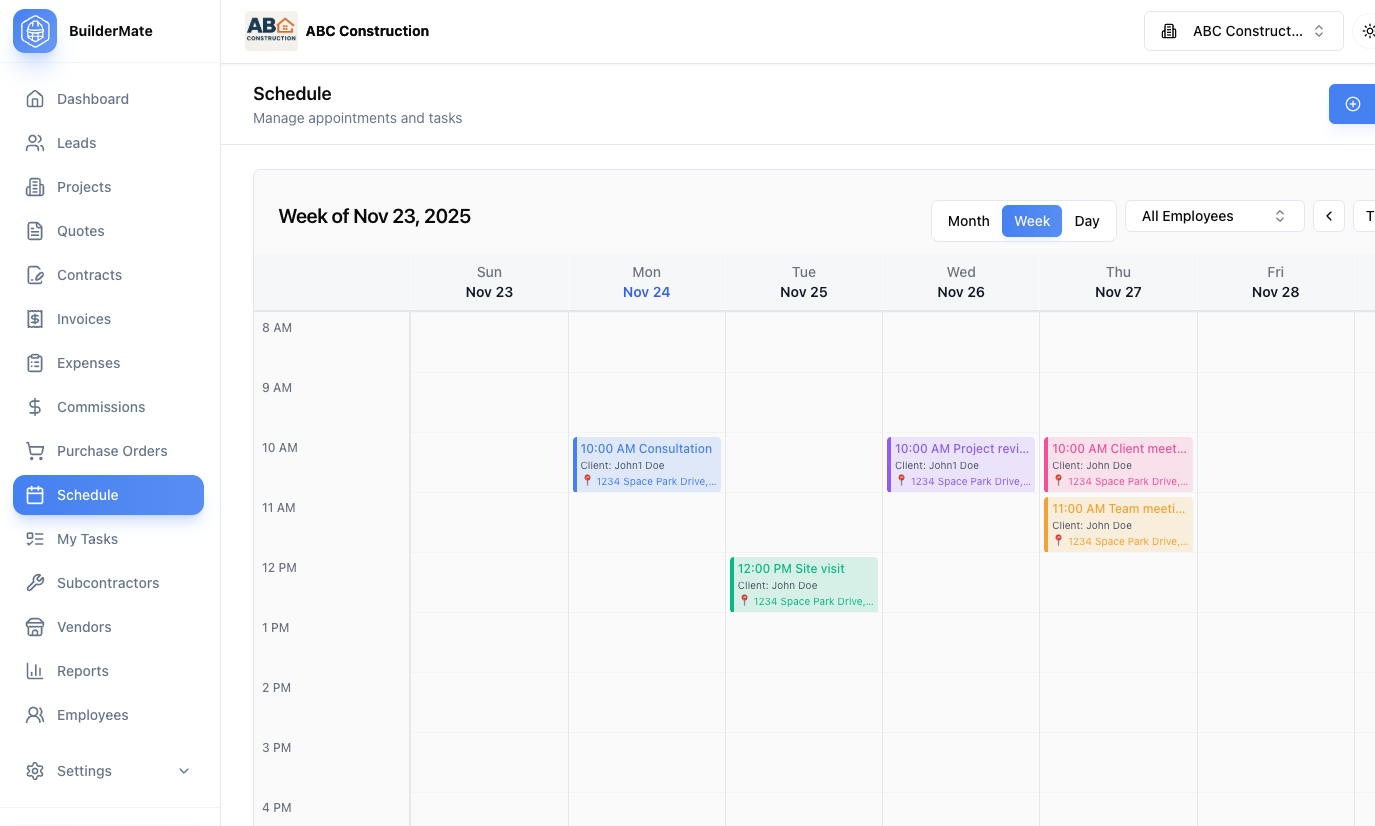
Multiple Calendar Views
Choose the view that fits your workflow. Month view for big-picture planning, week view for detailed coordination, and day view for managing today's schedule. Filter by team member, project, or appointment type. Color-coded events make it easy to see what's happening at a glance.
- Month, week, and day calendar views
- Color-coded appointment types
- Filter by employee or project
- Drag-and-drop rescheduling
- Today indicator and navigation
- Print-friendly views
Appointment Management
Create appointments with all the details: title, date, time, location, assigned team members, client, project, and notes. Set appointments as all-day events or specific time slots. Link appointments to clients and projects for complete context. Attach documents or photos to appointments.
- Detailed appointment information
- Client and project linking
- Location/address for site visits
- Internal notes and instructions
- File attachments
- Status tracking (scheduled, completed, cancelled)
Team Scheduling & Assignment
Assign crew members to appointments and jobs. See each team member's schedule to avoid conflicts and balance workload. Employees can view their own schedule on mobile devices. Set up crew-specific calendars for different trades or teams.
- Multi-employee assignment
- Employee schedule view
- Conflict detection
- Workload visualization
- Team availability tracking
- Role-based calendar access
Reminders & Notifications
Never have a client no-show again. Automatically send appointment reminders via SMS and email at your chosen intervals (e.g., 24 hours before, 2 hours before). Team members get notifications for their assigned appointments. Clients receive friendly reminders with appointment details and location.
- Automated SMS appointment reminders
- Email notification options
- Customizable reminder timing
- Team member alerts
- Client reminder messages
- Reduce no-shows by 60%+
Frequently Asked Questions
“Coordinating a crew of 12 across multiple job sites used to be a nightmare of phone calls and confusion. Now everyone sees the schedule on their phone, we send automatic SMS reminders to clients, and double-bookings are impossible. Our no-show rate dropped from 15% to under 3%.”
Complete Your Toolkit
These features work great together with what you just explored.
Take Control of Your Team's Schedule
Start coordinating your crew and reducing no-shows with BuilderMate's scheduling platform.